A clear second opinion for your mix.
An analysis plugin that compares your mix with a reference track and gives you practical next steps - right inside your DAW.
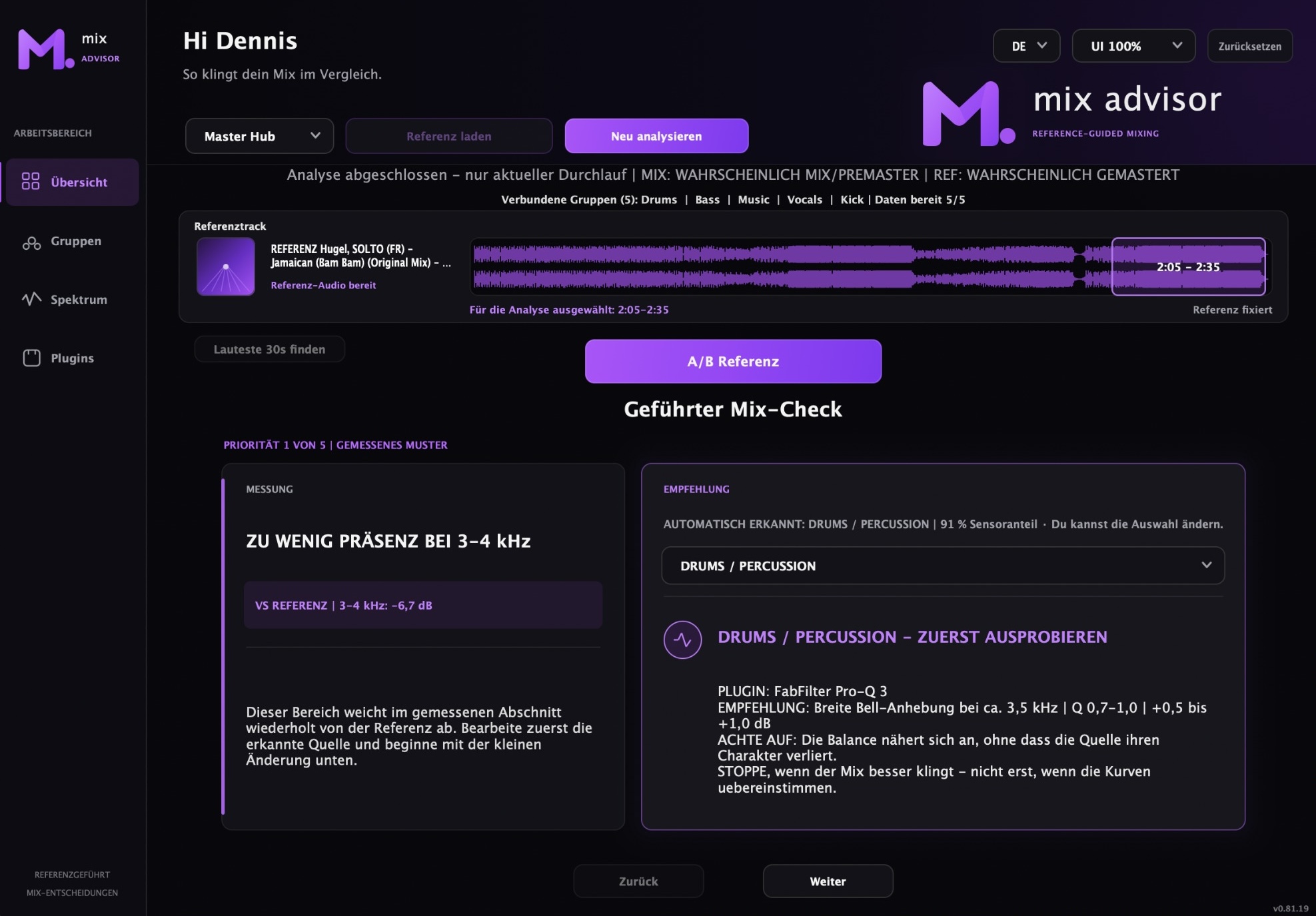
A clearer way to check your mix.
When something feels off, it helps to know where to start. Compare, investigate and try your next adjustment with more context.
Know what to try next
Get up to five prioritized recommendations, with practical starting points and guidance on what to listen for.
Compare with your reference
Check a 30-second passage against a reference you choose, focusing on a matching section.
Listen at matched levels
Switch between mix and reference with automatic level matching, so loudness has less influence.
Find likely sources
Add optional sensor instances to channels or buses to help identify which part contributes to a finding.
Check the bigger picture
Explore frequency balance, dynamics, stereo width and mono compatibility in one clear view.
Use your go-to plugins
Scan your installed plugin inventory and mark favorites mixfellow can suggest for an adjustment.
Turn a finding into a next step.
Each result connects a measured difference with a suggested adjustment and guidance on what to listen for.
Understand the difference
See how your mix compares with the reference and, where sensor analysis is available, which group may be contributing.
Try a focused adjustment
Where appropriate, get an EQ frequency, Q range and gain direction as a starting point to audition.
Listen for what matters
Use the listening guidance to judge your change, then run a fresh analysis against the same reference section.
You make the changes in your DAW. mixfellow does not apply processing automatically.
From reference to next move in four steps.
Add mixfellow
Place mixfellow as the last insert on your master and select Master Hub. Add optional sensors to channels or buses you want to check.
Choose a reference
Drop in a track or choose a file. mixfellow selects its loudest 30 seconds; move the window when another section fits better.
Measure your mix
Start the analysis and play a comparable section of your mix for 30 seconds without interruption. The master and sensors measure together.
Listen, adjust, repeat
Review recommendations and compare with matched-level A/B. Make a change in your DAW, then analyze again against the same section.
Put it to work in your session.
One focused plan for producers and mixing engineers who want to test a more intentional way to compare their work.
Everything you need to make more confident mixing decisions, in one straightforward plan.
mixfellow
Reference-guided mix analysis for macOS producers and mixing engineers.
- Reference-guided mix analysis
- Up to five prioritized recommendations
- Matched-level A/B comparison
- AU & VST3 for Apple Silicon and Intel
We'll help you complete your purchase and get started.
Check your setup.
mixfellow is built for macOS. Here's the current compatibility picture.
Minimum macOS requirements are still being finalized. Windows and AAX / Pro Tools are not currently supported.
A few things to know.
Straight answers for getting started with mixfellow.